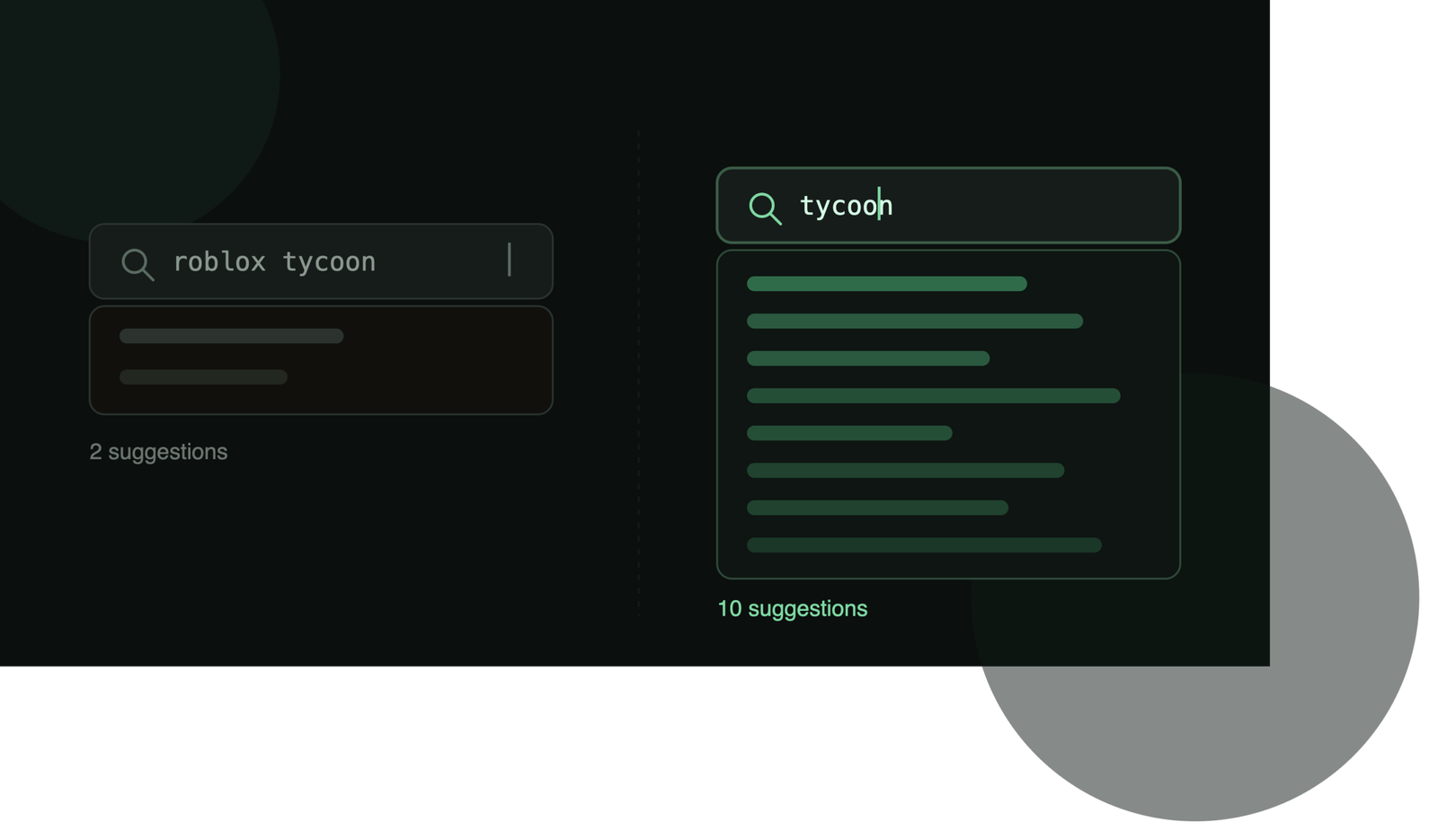
Type a few letters into Roblox’s search bar and a dropdown of suggestions appears before you’ve finished typing. Most developers ignore it completely, or treat it like a smaller version of Google’s autocomplete — a shortcut to see what’s “popular.” Neither assumption holds up. Based on direct testing of what Roblox’s search bar actually suggests across dozens of real queries, autocomplete behaves in ways that are useful for keyword research — but only if you know its blind spots first.
What Roblox’s Autocomplete Actually Is
As you type, Roblox suggests a list of completions — a mix of game titles and broader search phrases related to what you’ve typed so far. It’s built to help players finish typing faster, the same basic idea as autocomplete on any major search engine. But the data behind it works differently from what most developers assume, and that difference matters if you’re trying to use it for keyword research rather than just typing faster.
It Does Not Show You Search Volume
This is the single biggest misconception worth correcting up front. Tools like Google Keyword Planner exist specifically to show relative search volume — how many people are actually typing a given phrase. Roblox’s autocomplete isn’t built for that job. Every suggestion it returns carries no exposed popularity signal at all — there’s simply no number to compare one suggestion against another. A suggestion appearing doesn’t tell you whether it’s typed by ten players a day or ten thousand.
What autocomplete is useful for is different: it’s a map of related language — the phrases, genre words, and naming patterns Roblox’s own systems associate with what you typed. That’s genuinely valuable for choosing a title or writing a description (see our complete guide to Roblox SEO), just not as a volume signal.
Suggestions Are Tailored to the Searcher, Not Universal
Autocomplete isn’t a single fixed list that every player sees. It adapts to the language and region of the person searching. In practice, this means the exact same prefix can return noticeably different suggestions depending on who’s typing and from where — a detail that’s easy to miss if you only ever test from one account, one language, and one location, and then assume what you’re seeing is universal.
The practical takeaway: if you’re researching keywords for an English-speaking audience, make sure your testing setup actually reflects that — checking from a session set to a different language will quietly skew what you see.
The Big One: Adding “Roblox” to Your Search Collapses the Suggestions
Here’s the finding that actually changes how you should research keywords, and it’s not something we’ve seen documented anywhere else.
Most people outside the platform search the way an outsider naturally would — typing “roblox” first, then the game or genre they want, the same habit you’d use searching for anything on Google (“roblox tycoon games,” “roblox horror games”). Inside Roblox’s own search bar, that habit backfires. Prefixing a query with “roblox” doesn’t just add a word — it drastically narrows the suggestions that come back. In direct side-by-side testing, the prefixed version of a search returned a fraction of the suggestions — often just one or two — compared to ten full suggestions for the same query typed without “roblox” in front of it. This pattern held in the large majority of comparisons we ran.
The practical rule this leads to: when researching keywords inside Roblox, always test the bare term first — the genre, mechanic, or theme on its own, without “roblox” attached. You’ll consistently see a fuller, more useful spread of related language than if you search the way someone typing into Google would.
A Practical Framework for Using Autocomplete in Keyword Research
- Start bare. Type your core genre or mechanic word alone — no “roblox” prefix — and record the full suggestion list.
- Note the mix, not just the count. Pay attention to which suggestions are specific game titles versus broader phrases — the broader phrases are usually the more reusable keyword material for your own title and description.
- Cross-check against real search results. Autocomplete tells you what language exists around a term; it doesn’t tell you who’s currently winning that term. Pair it with an actual search of the term to see who ranks — LensBlox tracks that ranking directly if you want it without doing the searches by hand.
- Don’t treat a short list as “low interest.” Since there’s no volume signal exposed, a short suggestion list most often means you accidentally searched a narrower or prefixed version of the term — not that nobody’s searching it. Go back and try the bare version before concluding the term isn’t worth targeting.
Autocomplete vs. Search Ranking: Two Different Systems
It’s worth being clear that autocomplete and actual search ranking are separate systems that happen to share a search bar. Autocomplete shapes what a player sees before they hit enter; ranking determines what shows up after. Doing well in one has no guaranteed relationship to the other. For the full picture of how the ranking side actually works, see our deep dive into how Roblox search actually works.
Frequently Asked Questions
Does Roblox autocomplete show real search volume? No. Unlike tools built specifically for keyword research, it exposes no popularity or volume figure — only which phrases are suggested, not how often they’re searched.
Why does searching “roblox [genre]” give fewer suggestions than just “[genre]”? Prefixing with “roblox” measurably narrows the suggestion pool in direct testing — likely because it’s treated as redundant context rather than part of the meaningful query. Drop the “roblox” prefix when researching keywords for a fuller picture.
Do autocomplete suggestions affect my game’s search ranking? No — autocomplete and search ranking are separate systems. Appearing in autocomplete suggestions doesn’t influence where your game ranks once someone actually searches.
Does everyone see the same autocomplete suggestions? No — suggestions adapt to the language and region associated with the searcher, so results can vary meaningfully between accounts.
Autocomplete shows you related language — LensBlox shows you where your game actually ranks against it, with the methodology behind every score shown.
Get the complete Roblox discoverability guide.
Everything in this article, plus the full strategy — built from real ranking data, not recycled advice. Free.